

Count What Reaches the Human
A smarter front door can improve resolution and increase escalations. Containment alone won't tell you which happened.


Your daily signal on AI and CX — minus the hype.
DCX Stat of the day: 85% of customer-service and support leaders are expanding human-agent responsibilities as AI reduces contact volume and shifts work toward higher-value tasks. Just 31% have implemented or are planning AI-driven frontline layoffs through the first quarter of 2027. Gartner
In this issue:
→ A better bot sends different work upstairs
→ Containment gets a downstream reality check
→ Frontline efficiency doesn’t always reduce effort
→ Chordia shows what changed across customer conversations
→ Fragmented rules turn governance into journey design
🔍 DEEP DIVE
A Better Bot Can Send More Work Upstairs
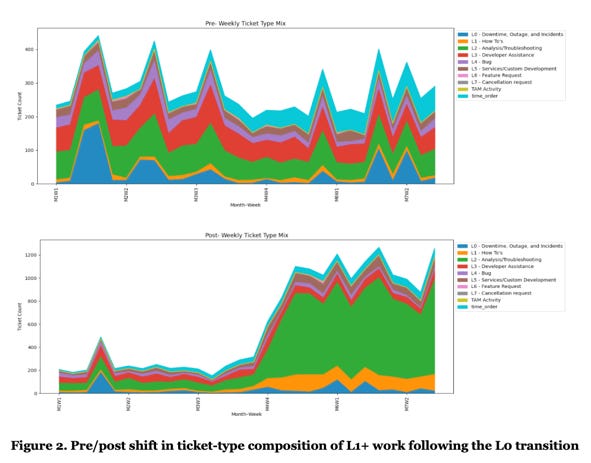
The customer asks the bot for help. The bot can’t finish the job, so the case reaches a person. Most dashboards call that a failure. New B2B support research suggests that conclusion may be too tidy.
Researchers studied a global software company that replaced a rule-based Level 0 bot with a conversational AI agent. They compared seven months before and after the change using service records for cases that reached human teams. Early findings show more work flowing into Level 1 and above, better resolution outcomes after an initial transition period, and a shift toward troubleshooting cases.
That doesn’t prove every escalation got better. The public abstract doesn’t disclose ticket counts, effect sizes, customer satisfaction, repeat contact, or workload. But it does expose the blind spot in containment. A better bot may uncover real intent, route harder cases more accurately, and change what humans spend their time solving. If leaders only watch how many conversations stay inside automation, they can miss whether the service system improved.
Bottom Line: Judge the AI front door by the work it changes downstream, not just the work it keeps away from people.
📬 Copy-Paste Take
Containment is a routing number, not a customer outcome. When an AI agent changes the mix of work reaching people, measure escalation quality, case difficulty, time to resolution, repeat contact, and employee effort before calling the bot a success.
🧭 OPERATOR PLAYBOOK
Audit the Queue Behind the Queue
Pick one AI-supported service journey and compare the cases reaching people before and after the AI change. Don’t average the hard cases into a cheerful containment rate.
Audit every AI-to-human flow for four things:
Case mix: Did the proportion of billing, access, troubleshooting, complaint, or exception work change?
Handoff quality: Does the person receive the customer’s intent, history, attempted steps, and unresolved question?
Total effort: Did customer repeats, human review, rework, and follow-up fall or move somewhere less visible?
Stability: How long did performance take to settle, and what changed during that transition?
Then compare resolution and repeat contact within each case type, not only across the whole queue.
Ask your team: What work did the AI remove, and what work did it quietly make harder?
Signal: If the case mix changes, the old service baseline is no longer an honest comparison.
📊 MARKET REALITY CHECK
Efficiency Without Less Effort Isn’t Efficiency
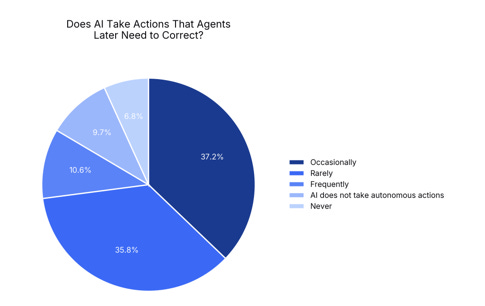
In Typewise’s survey of 207 service agents across the U.S., UK, and Germany, 72% said AI improves efficiency, but only 42% said it reduces time and effort. Nearly half said they regularly correct AI mistakes, and 10% said they sometimes discover errors only after customers report them.
This is self-reported, vendor-sponsored research. It doesn’t prove AI caused the extra work. It does show why leaders need to separate faster task completion from lower total effort. Drafting a reply faster means little if the agent must verify an action, reconcile another system, repair the answer, or wait for the customer to catch the mistake.
Why it matters: AI can make one task look faster while leaving the customer and frontline team with the same workload in a different shape.
Faster step + hidden correction = borrowed efficiency.
🧰 TOOL WORTH KNOWING
Chordia Compass
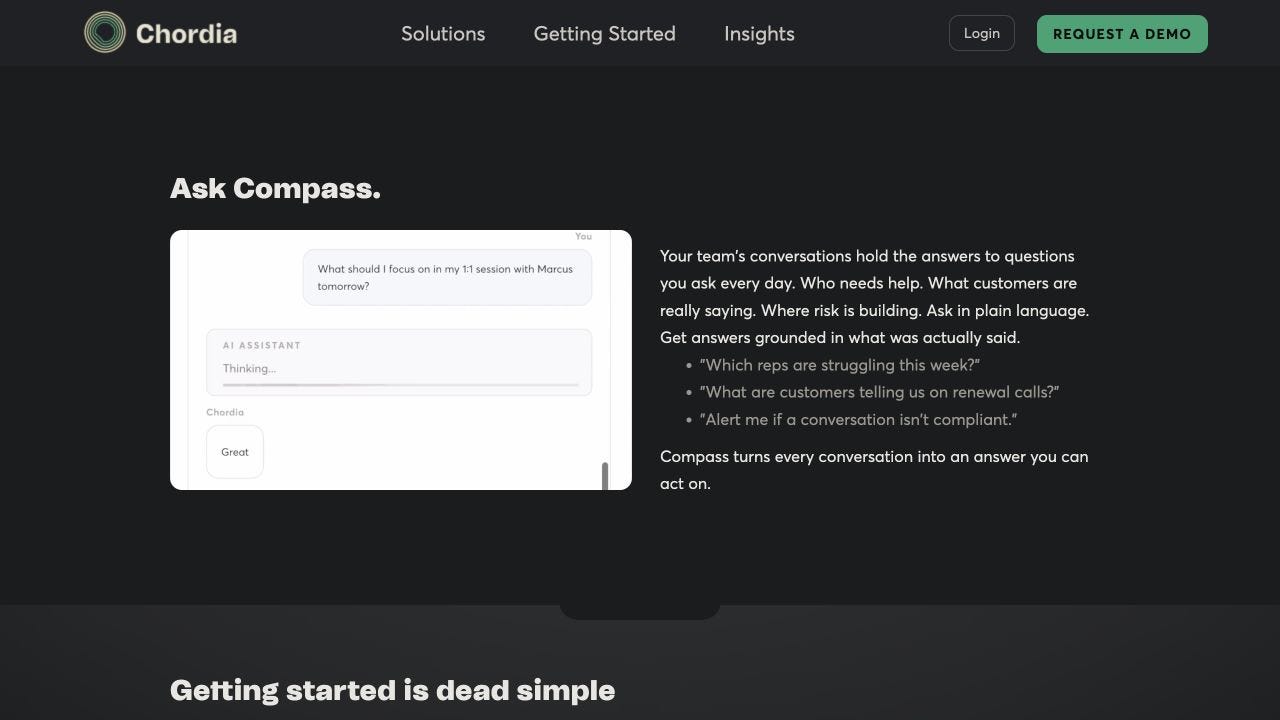
What it does: Chordia analyzes calls, chats, and other transcribed interactions against your quality and compliance standards. Its Compass platform turns the conversations into structured findings, then links those findings back to the specific quotes and moments behind them.
CX use case: Compare the conversations reaching human teams before and after an AI routing change. Look for shifts in customer intent, friction, promises made, handoff quality, and the coaching needs that appear downstream.
Worth watching because: This is a measurement layer for the queue behind the queue. Operators can ask plain-language questions across the conversation set, spot patterns that a small QA sample may miss, and inspect the evidence before deciding what to fix.
Bottom line: If AI changes the work reaching people, Chordia can help show what changed, where the journey broke, and which team owns the fix.
Source: Chordia
The DCX AI Today - AI Tool Directory - If you lead a CX team and want a curated shortlist of tools worth evaluating, this is your starting point.
📡 90-SECOND CX RADAR
Your AI Disclosure Can’t Stop at the Border
Customer-facing AI now sits inside a patchwork of national, regional, and state rules. A disclosure, review path, or data practice that clears one market may fail in another.
Why it matters: Governance belongs in journey design when the customer’s location changes what the system must explain, record, or let them challenge.
✅ YOUR MOVE
AI doesn’t simply remove service work. It changes what reaches people, when it arrives, and how hard it is to finish.
That means the downstream queue is part of the AI product.
Take one high-volume AI-to-human journey. Pull 25 recent escalations and tag the customer intent, case difficulty, context carried forward, total resolution time, repeat contact, and correction work.
Review the sample with the AI owner and frontline lead. Pick one missing context field, one bad routing rule, or one after-hours promise to fix this week. Then measure the same sample again in 30 days.
Don’t ask only what the bot contained. Ask what kind of work it created.
Until tomorrow,

👥 Share This Issue
Think of one person who’s wrestling with AI in CX right now
and forward this to them.
I’m obsessed with Wispr Flow Pro! Get a Free Month on me.

If someone forwarded this to you, they thought you needed to see it before your next AI planning meeting. Get your own copy.