

Don't Let the Default Choose Your AI Policy
Atlassian's new data terms turn an admin default into a customer-trust decision few CX teams will ever see.


Your daily signal on AI and CX — minus the hype.
DCX Stat of the day: 59% of B2B CX programs use AI for text or sentiment analysis, but only 18% use it to generate actions. CustomerGauge
IN THIS ISSUE
Atlassian puts AI data policy inside admin
AI feedback programs stop at interpretation
Zendesk makes agent procedures reviewable
Interactive explanations may influence reliance
Owners and measures belong next to every toggle
🔍 DEEP DIVE
Someone Chose the Setting. Was It You?
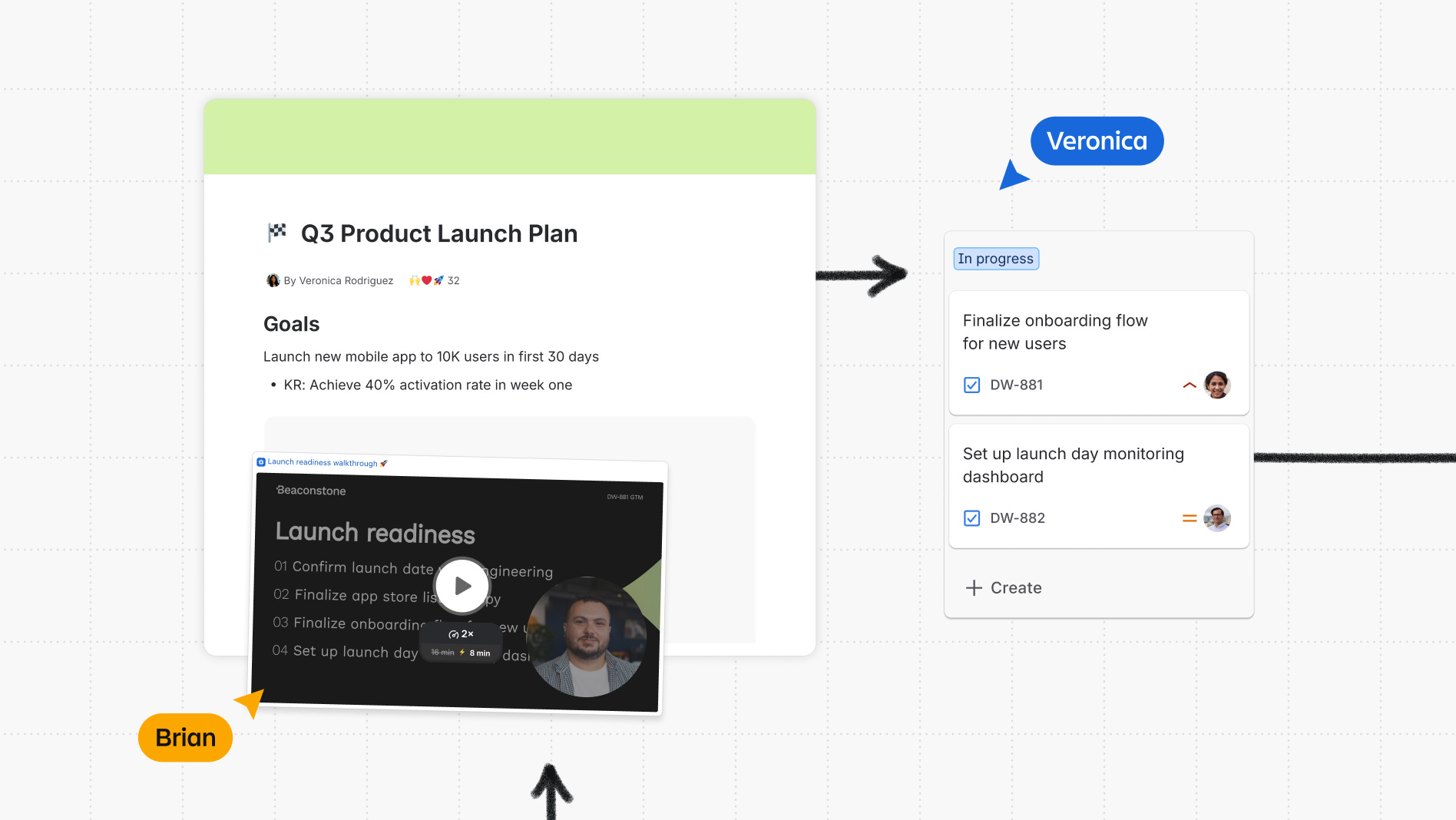
A customer explains a sensitive problem in a service ticket. A frontline employee adds context. Someone moves the history into an internal knowledge page. The ticket was created to solve one customer’s problem. Under a vendor’s data-contribution terms, the same material may also help improve AI experiences for other customers.
Starting today, Atlassian says eligible metadata and, depending on plan settings, in-app data from Jira, Confluence, and Jira Service Management may be used to improve apps and AI experiences across customers. Atlassian says contributed data is de-identified and aggregated. It also gives organization admins controls for in-app data. But metadata contribution defaults to on across every listed plan, and only Enterprise customers can opt out of metadata contribution.
The setting reaches beyond security administration. Customer language, complaint details, employee notes, workflow names, and support history can reveal account context or sensitive circumstances even after identifiers are removed. CX, privacy, legal, security, and product leaders need to know what the admin selected, which data enters the system, and whether that use fits the promise made to customers.
Bottom Line: A vendor default changes how customer and employee data is used. Give that decision a business owner, a documented rationale, and a review date.
📬 Copy-Paste Take
If customer conversations, service tickets, or journey notes can improve an AI system beyond your organization, privacy, CX, legal, security, and product should make the decision together. The vendor chose the starting setting. Your organization still owns the customer promise.
🧭 OPERATOR PLAYBOOK
Find the Decision Hiding in Admin
Pick one platform where customer conversations, complaints, support notes, or journey research can feed AI improvement.
Audit every data-contribution choice for four things:
Scope: Which fields, prompts, comments, attachments, and connected apps are included?
Purpose: Is the data improving your own experience, the vendor’s products for everyone, or both?
Authority: Who approved the setting, and does that person own customer trust or only system access?
Exit: If the choice changes, what stops collection, what gets removed, and how long does removal take?
Then compare the admin setting with your privacy notice, customer promise, vendor-risk record, and frontline guidance. If the setting conflicts with any of those records, reopen the decision.
Ask your team: Which AI data choices are currently being made by whoever found the toggle first?
Signal: Customer consent and accountable ownership belong in the design of AI improvement.
📊 MARKET REALITY CHECK
The ROI Forecast Is Running Ahead of the Receipts
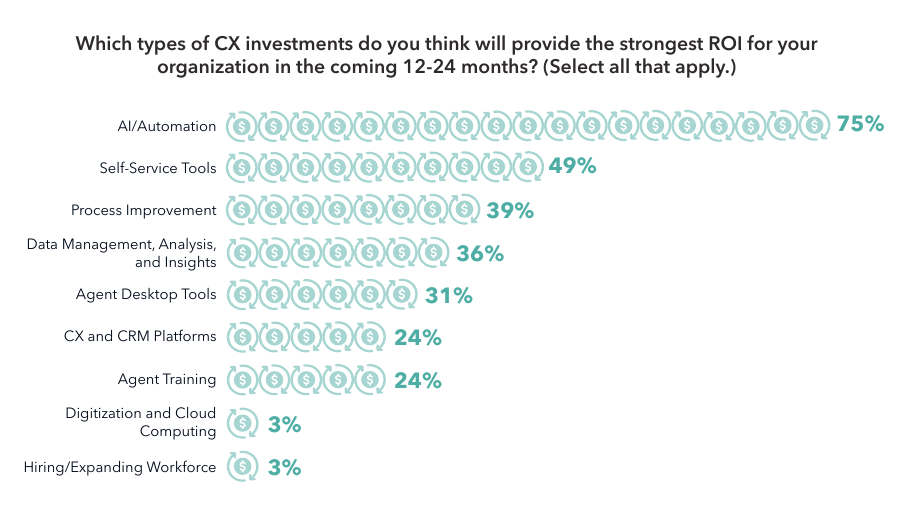
75% of CX leaders expect AI and automation to deliver their strongest return during the next two years. Yet only 4% say their organization has a highly standardized way to calculate CX ROI.
Those numbers describe a funding problem. AI budgets are being approved against anticipated value while each team may still define return differently. Without an agreed baseline, adoption measure, customer outcome, financial measure, and owner, a promising rollout can enter budget review with no shared proof of what changed.
Why it matters: A rollout can meet its technical targets, expand across journeys, and still lose funding because Finance, CX, and Operations disagree about the result and who gets credit.
Before launch, record the baseline, target customer behavior, operating measure, financial measure, owner, and review date.
🧰 TOOL WORTH KNOWING
Zendesk Generative Procedure Maps
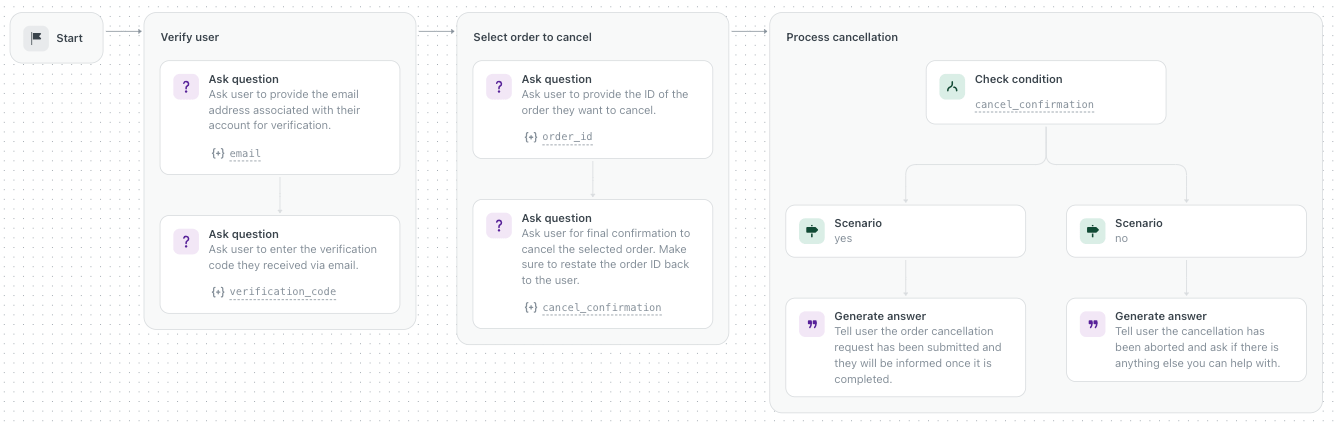
What it does: Zendesk turns an AI agent’s customer-facing procedure into a visible map. Teams can now directly edit individual blocks, test draft changes, save versions, restore earlier logic, and publish only when the procedure is ready.
CX use case: Map a cancellation flow from identity verification through order selection, confirmation, action, and recovery. If the agent asks the wrong question or routes a condition incorrectly, the team can change that block instead of regenerating the entire workflow and hoping the new version behaves.
Worth watching because: A CX lead can sit with service operations, product, and legal, review the same branch logic, and approve a named version before customers encounter it.
Bottom line: The map improves control only when one owner tests edge cases, reviews recovery paths, and signs off before publication.
The DCX AI Today - AI Tool Directory - If you lead a CX team and want a curated shortlist of tools worth evaluating, this is your starting point.
📡 90-SECOND CX RADAR
When an Explanation Starts Selling the Answer
A new AMCIS paper compares static and interactive AI explanations in a 100-person hotel-review deception task. The experiment asks whether conversation increases perceived humanness, changes perceptions of persuasive intent, and affects reliance. The public abstract describes the design but does not report the results.
Why it matters: Treat explanation style as a behavioral design choice. In usability testing, track answer quality, confidence calibration, and override behavior alongside satisfaction.
✅ YOUR MOVE
Customers rarely see the data-contribution setting, procedure map, or ROI spreadsheet. They experience the result through the answer they receive, the action the AI takes, and the recovery path available when it gets something wrong.
This week, choose one customer-facing AI workflow and bring the organization admin, CX, privacy, security, product, and operations into a 20-minute review. Confirm what customer data enters the system, who approved that use, which actions the AI can take, how customers recover from a bad decision, and what stops or reverses the workflow.
Finish by naming the customer behavior, operating result, and financial measure that should improve. Put a review date on the calendar before the meeting ends.
Write down four names before launch: the owner of the data choice, the workflow, the customer outcome, and the financial proof.
Until tomorrow,

👥 Share This Issue
Think of one person who’s wrestling with AI in CX right now
and forward this to them.
I’m obsessed with Wispr Flow Pro! Get a Free Month on me.

If someone forwarded this to you, they thought you needed to see it before your next AI planning meeting. Get your own copy.