

Give the Next-Best Action a Back Button
Personalization can improve service and revenue. It can also make a bad guess follow the customer everywhere.


Your daily signal on AI and CX — minus the hype.
DCX Stat of the day: 45% of active AI users turn to it for advice or recommendations. Source: American Customer Satisfaction Index
In this issue:
→ Service context can drive revenue
→ Customers need to correct bad recommendations
→ Field workers still lack the full story
→ Shared AI memory needs clear boundaries
→ Accessibility checks move into the build process
🔍 DEEP DIVE
The Offer Knows You. Can You Tell It It’s Wrong?
Circles has built an AI concierge for telecom customers. It can see account history, what the customer is doing in the app, billing, subscriptions, and network activity. Its CareX system sends each job to a specialist agent, limits what that agent can see, and passes the whole conversation to a person when needed.
That makes some genuinely useful things possible. A customer checking roaming options can get a relevant add-on. Someone disputing a bill can reach the right person without telling the whole story again. Circles says its AI recommendations increased average revenue per user by 22% and reduced churn by 9% in Singapore.
The catch is what happens when the system gets the customer wrong. A bad guess can move from the recommendation to the service record and then show up again next time. Circles has controls for data access, human handoffs, gradual rollouts, and rollback. Good. The customer also needs an easy way to say no, fix the bad assumption, and keep going.
Bottom Line: Better context can make an offer more useful. Giving the customer a way to correct it keeps useful from turning pushy.
📬 Copy-Paste Take
If we’re going to scale a next-best-action system, we should be able to explain why an offer appeared, what shaped it, how the customer can correct it, and whether that correction sticks. It isn’t really personalization if the customer can’t tell the system, “You’ve got me wrong.”
🧭 OPERATOR PLAYBOOK
Test the Wrong Recommendation
Pick one AI-generated offer or service recommendation. Then feed it a bad assumption on purpose.
Audit the journey for four things:
What triggered the recommendation.
What the customer can see about it.
How the customer can fix or decline it.
What the employee gets when AI hands off.
Now see whether the correction reaches the customer profile, the recommendation engine, the service record, and the next interaction.
Ask your team: Can the customer fix the mistake without starting over?
Signal: If there’s no back button, it isn’t much of a conversation.
📊 MARKET REALITY CHECK
The Field Worker Still Doesn’t Have the Customer Story
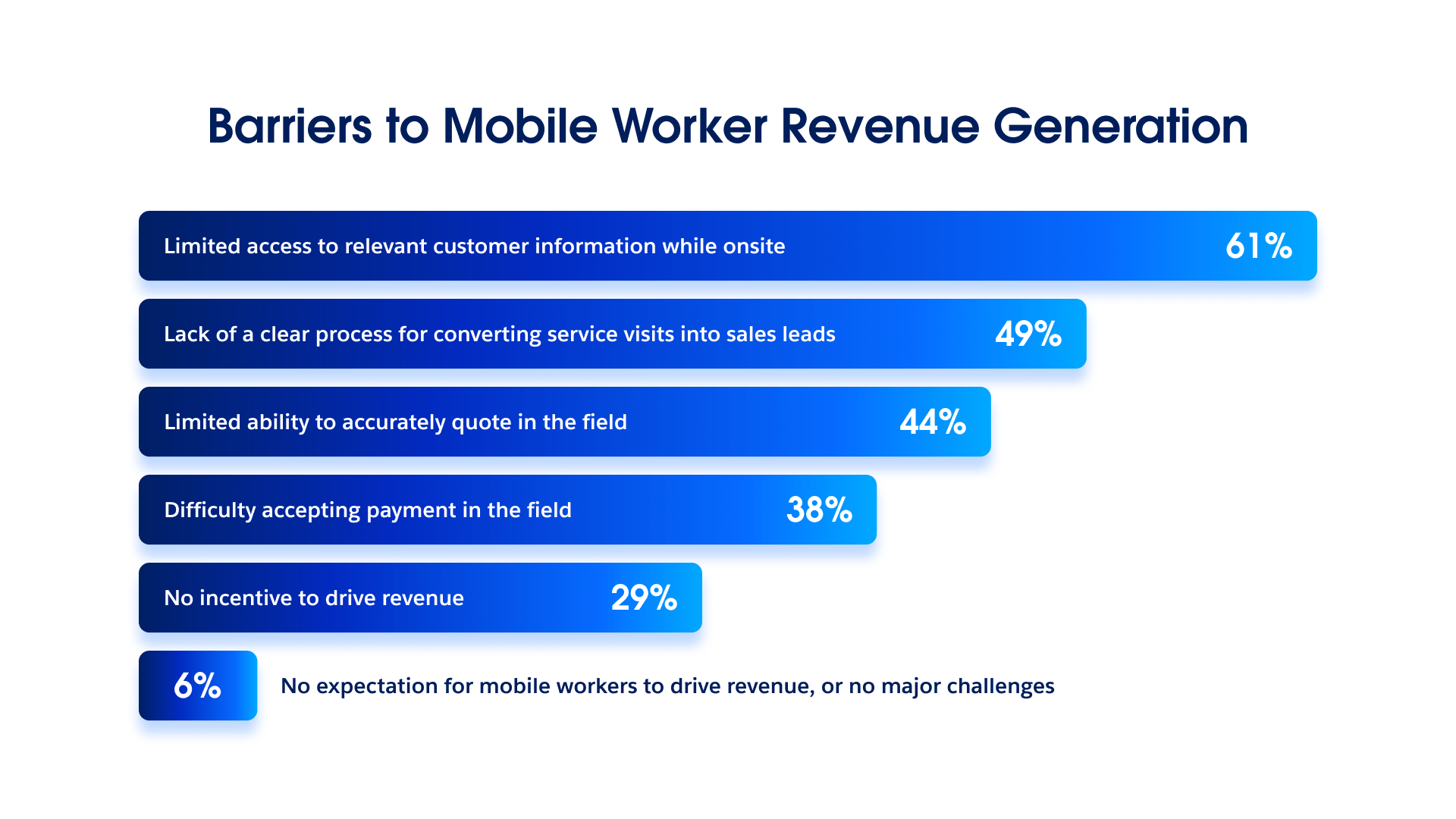
Salesforce found that 61% of field-service organizations say mobile workers don’t have enough customer information when they’re onsite. Only 16% say their field and back-office systems are on one platform.
So the AI might suggest the right next step while the technician standing in front of the customer still has to piece together the history from apps, spreadsheets, sensors, and paper logs. That’s not a data strategy. It’s a scavenger hunt. The same research found that 40% struggle to tell whether AI is working, even though 85% say they’ve measured the return.
Why it matters: Don’t just measure whether AI made a recommendation. Check whether the person facing the customer had enough information to use it, explain it, correct it, and finish the job.
Data Source: Salesforce
A smart recommendation isn’t much help if the frontline can’t use it.
🧰 TOOL WORTH KNOWING
Claude Tag
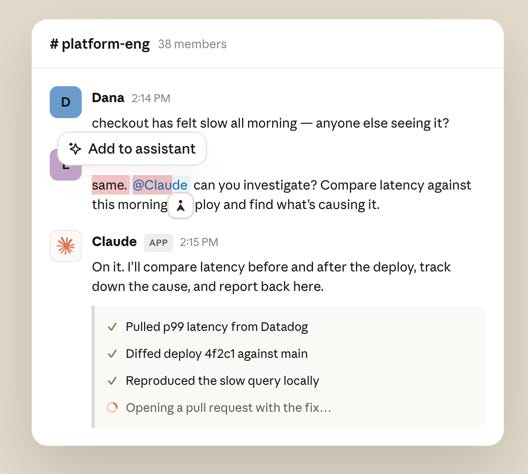
What it does: Claude Tag works inside selected Slack channels with the tools, files, memory, and access a company gives it. It can keep working across days, schedule follow-ups, report when something is done, and leave the whole exchange visible in the channel.
CX use case: Put it in a service-operations channel where support, product, engineering, and policy teams work through recurring customer problems. It can hold onto the evidence, decisions, and loose ends that usually disappear between handoffs.
Worth watching because: Anthropic switched its Slack integration to Claude Tag on August 3. So this isn’t just a bot answering questions in Slack. It’s a shared agent that remembers, follows up, and keeps working. That sounds useful. It also raises some basic questions: Who can give it work? What can it reach? Who approves anything that affects a customer? And who checks what it did?
Bottom line: Shared memory can save a lot of repeated work. Keep it limited by channel, name the person responsible for its actions, and check what it remembers.
The DCX AI Today - AI Tool Directory - If you lead a CX team and want a curated shortlist of tools worth evaluating, this is your starting point.
📡 90-SECOND CX RADAR
Accessibility Moves Into the AI Build Loop
Siteimprove says its accessibility agent now works inside Claude, Lovable, VS Code, and Figma. It can spot and fix accessibility problems while people and AI agents are still creating the experience. The Figma integration adds audit reports, color-blindness checks, and fix recommendations before a design reaches development.
Why it matters: AI lets teams make more digital stuff, faster. It can also help them make more inaccessible stuff, faster. Put the accessibility check inside the work, not at the end of the release queue.
✅ YOUR MOVE
Personalization and shared agent memory make the same promise: nobody should have to start over.
That promise falls apart when the information is wrong.
This week, pick one customer recommendation and one AI-assisted handoff inside the company. Add an old preference, the wrong intent, a disputed charge, or an outdated policy. Then follow the correction.
If the mistake survives into the next decision, you’ve built memory without accountability.
Context is only useful if someone can correct it.
Until tomorrow,

👥 Share This Issue
Think of one person who’s wrestling with AI in CX right now
and forward this to them.
I’m obsessed with Wispr Flow Pro! Get a Free Month on me.

If someone forwarded this to you, they thought you needed to see it before your next AI planning meeting. Get your own copy.